CHAPTER SEVEN - INPUT FORMAT
1. TYPES OF FILES
SNAP input consists of seven input files. Three files are used for polygon data: attribute (.UA), stick (.US), and point (.UP), two files for road network data: attribute (.LA), and point (.LP). and two files are for stream network data: attribute (.SA) and point (.SP). Definitions for the types of data in each file are given below.
2. FILE SYNTAX
The syntax for the data is:
Alphanumeric data is shown as a series of X'S for example XXXXXXXXXXX where the maximum length of string is eleven characters (X's).
Numeric data is shown as ###.## where the presence of the decimal point indicates whether the data is integer or real and the number of # signs to the right of the decimal indicates the maximum precision of the data.
Other Notes:
a) The data file structure uses comma delimited fields.
b) Double quotation marks need to enclose all alphanumeric data.
c) All alphanumeric data needs to be upper case.
d) SNAP uses the alphanumeric code to identify data for polygon, road and stream attributes. If you do not want to include data in your input file, then leave the entire line out of the data set.
e) Rows in the attribute files (.UA,.LA,.SA) do not need to be in any specific order, except that all rows associated with a specific polygon must be together. The rows in all other files must be in the order specified.
f) Each attribute file must have at least one entry, for example, its area (polygon attribute file), terrain type (road attribute file), or class (stream attribute file).
3. POLYGON INPUT FILES
Attribute File (.UA)
POLYGON
LABEL
"XXXXXXXXXXX","AREA",#######.## Polygon acreage
"XXXXXXXXXXX","ENT1-XXXXXXXXXXX",#######.## Timber entry node 1
"XXXXXXXXXXX","ENT2-XXXXXXXXXXX",#######.## Timber entry node 2
"XXXXXXXXXXX","ENT3-XXXXXXXXXXX",#######.## Timber entry node 3
"XXXXXXXXXXX","STRM-XXXXXXXXXXX",#######.## Stream entry node
"XXXXXXXXXXX","SIL1",#######.## Silvicultural treatment 1
"XXXXXXXXXXX","SIL2",#######.## Silvicultural treatment 2
"XXXXXXXXXXX","SIL3",#######.## Silvicultural treatment 3
"XXXXXXXXXXX","STAT",#######.## Status code
"XXXXXXXXXXX","UNFX",#######.## Unit fixed cost
"XXXXXXXXXXX","SPE1",#######.## Species 1
"XXXXXXXXXXX","SPE2",#######.## Species 2
"XXXXXXXXXXX","SPE3",#######.## Species 3
"XXXXXXXXXXX","VOL1",#######.## Gross volume/acre 1
"XXXXXXXXXXX","VOL2",#######.## Gross volume/acre 2
"XXXXXXXXXXX","VOL3",#######.## Gross volume/acre 3
"XXXXXXXXXXX","DEF1",#######.## Defect percent 1
"XXXXXXXXXXX","DEF2",#######.## Defect percent 2
"XXXXXXXXXXX","DEF3",#######.## Defect percent 3
"XXXXXXXXXXX","QUA1",#######.## Quality premium 1
"XXXXXXXXXXX","QUA2",#######.## Quality premium 2
"XXXXXXXXXXX","QUA3",#######.## Quality premium 3
"XXXXXXXXXXX","SERS",#######.## Beginning seral stage
"XXXXXXXXXXX","PSER",#######.## Perimeter seral stage
"XXXXXXXXXXX","HAR1",#######.## Harvest system 1
"XXXXXXXXXXX","HAR2",#######.## Harvest system 2
"XXXXXXXXXXX","HAR3",#######.## Harvest system 3
"XXXXXXXXXXX","AYD1",#######.## Average yarding distance 1
"XXXXXXXXXXX","AYD2",#######.## Average yarding distance 2
"XXXXXXXXXXX","AYD3",#######.## Average yarding distance 3
"XXXXXXXXXXX","HVC1",#######.## Harvest cost $/MBF gross 1
"XXXXXXXXXXX","HVC2",#######.## Harvest cost $/MBF gross 2
"XXXXXXXXXXX","HVC3",#######.## Harvest cost $/MBF gross 3
"XXXXXXXXXXX","AT01",#######.## Attribute 1
"XXXXXXXXXXX","AT02",#######.## Attribute 2
"XXXXXXXXXXX","AT03",#######.## Attribute 3
. . . .
. . . .
"XXXXXXXXXXX","AT50",#######.## Attribute 50
<EOF>
Note:
1. Rows in the .UA file can be in any order.
2. Rows for missing data are ommitted.
3. Attribute identifiers for "AT01" through "AT50" have
numbers for the last two characters, not letters.
Stick File (.US)
POLYGON X COORD Y COORD Z COORD
LABEL
"XXXXXXXXXXX",####### Unit label, state plane/UTM.
"XXXXXXXXXXX",####### Unit label, state plane zone.
"XXXXXXXXXXX",####### Unit label, polygon label X coordinate.
"XXXXXXXXXXX",####### Unit label, polygon label Y coordinate.
"XXXXXXXXXXX",#######,#######,#######
"XXXXXXXXXXX",#######,#######,#######
"XXXXXXXXXXX",#######,#######,#######
. . . .
. . . .
"XXXXXXXXXXX",#######,#######,#######
<EOF>
Note: The stick polygon must have at least three vertices.
Point File (.UP)
POLYGON X COORD Y COORD Z COORD
LABEL
"XXXXXXXXXXX",####### Unit label, state plane/UTM.
"XXXXXXXXXXX",####### Unit label, state plane zone.
"XXXXXXXXXXX",####### Unit label, polygon label X coordinate.
"XXXXXXXXXXX",####### Unit label, polygon label Y coordinate.
"XXXXXXXXXXX",#######,#######,#######
"XXXXXXXXXXX",#######,#######,#######
"XXXXXXXXXXX",#######,#######,#######
"XXXXXXXXXXX",#######,#######,#######
. . . .
. . . .
. . . .
"XXXXXXXXXXX",#######,#######,#######
<EOF>
Note: The points polygon must have at least three vertices.
Definitions
1. Unit label -- The name of the unit.
2. Unit area -- The area of the unit in acres.
3. Sivicultural treatments -- At least one, and up to three candidate silvicultural treatments. Silvicultural treatment codes must be integers between 1 and 10. They are used to describe the percent harvest at a given period and the resulting growth. See discussion in Chapter 3, Silvicultural Prescription Editor.
4. Status -- This can be used to hardwire which period a unit must go. See Chapter 3, Sale Editor for status codes.
5. Fixed cost -- Used to pass SNAP a fixed cost associated with a polygon (unit). This fixed cost will be "charged" the first time this polygon is entered for any type of harvest.
6. Species code --A number you want to associate with a species.
7. Volume -- The gross volume per acre for each species, mbf/acre.
8. Defect -- The percent defect for each species.
9. Quality premium -- A quality differential (positive) that the mill will pay over and above the base species values in the Mill Editor. This can be used to recognize quality differences within a species or a species groups. If a quality premium is entered here and a mill price is entered in the Mill Editor, SNAP will add them together at analysis time.
10. Beginning Seral Stage -- An integer between 1 and 40 used to describe the seral stage of the polygon (unit) at the beginning of period 1.
11. Perimeter Seral Stage -- The beginning seral stage to be given to the outside edge of this polygon for use in calculating habitat effectiveness.
12. Stream Entry Node -- Used to pass the name for the stream node where runoff from this polygon enters the stream system.
13. Timber Entry Nodes -- Used to pass the alphanumeric entry node for timber to enter the road system from the unit for each harvesting alternative from above. SNAP ignores the number (#######.##) following the comma. The number is only to maintain consistency in the spreadsheet input format. If you pass timber entry node choices they must be accompanied by harvest system choices and vice versa.
14. Harvest System Choices -- Used to pass one or more harvest system alternatives into SNAP. Harvest system alternatives can be optionally entered in the Harvest System and Landings editors. If you pass Harvest System Choices they must be accompanied by timber entry nodes and vice versa.
15. AYD -- The average yarding distance for each timber entry point, ft. If entered here, SNAP will show and use this number rather than calculate its own average yarding distance in the Landings editor.
16. Harvest cost -- Used to pass the stump-to-truck harvest costs for the harvesting alternatives. Harvest system costs can be optionally entered in the Harvest System editor. If a harvest cost is entered here it will appear as an Override Variable Cost in the Sale Editor.
17. Attributes --Used to describe attributes of the polygon which in general do not change over time. The attribute values are boolean, that is, they are YES/NO. For example, if the polygon has a ground slope between 20 and 40 percent it might have an attribute value of 10. In this case, the attribute value 10 means the polygon has a ground slope between 20 and 40 percent. If the polygon does not have this attribute value, it's ground slope is not between 20 and 40. The attribute number must be an integer between 1 and 50. Attribute numbers can be used to control pattern generation and to prepare reports. See Chapter 3.
18. Coordinate conversion -- Used to tell SNAP if the coordinate data is in feet (State Plane, SP) or in meters (Universal Tranverse Mercator, UTM). SNAP is written for English units. If you enter the value of 2 for UTM, SNAP will multiply all coordinates by 3.281. The second entry is a six digit coordinate zone code which SNAP does not use but is useful if you want to update your sequential ASCII files in LT Plus.
19. Label X-coordinate -- The x-coordinate of the unit label for plotting on graphic displays.
20. Label Y-coordinate -- The y-coordinate of the unit label for plotting on graphic displays.
21. X,Y,Z coordinates -- The coordinates of the vertices of the stick figure. SNAP uses two types of figures to describe polygons (units): "stick" figures and "points" figures. The objective of the stick figure is to define the minimum number of vertices of a polygon required to identify adjacency with other polygons.
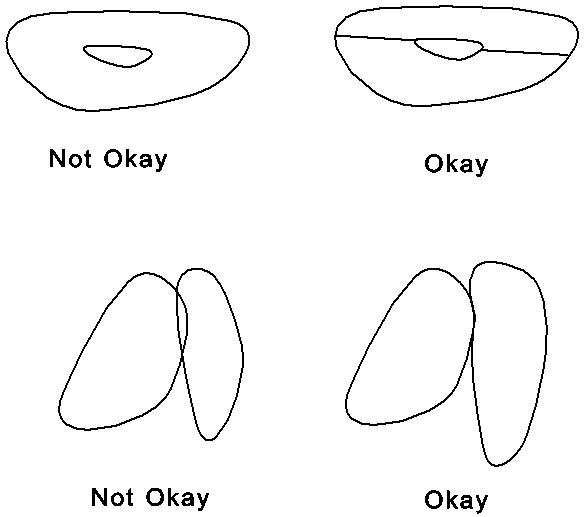
Notes on digitizing polygons
(a) A maximum of 25 vertices is permitted in a stick figure. The "points"
figure gives a truer picture of the polgyon. A maximum of 1500 vertices can be passed to SNAP in the points figure.
(b) Polygons must have at least three vertices.
(c) Polygons must not lie inside other polygons.
(d) Points on adjacent polygons must line up. If not, SNAP will not be able to correctly follow the adjacency rules for scheduling.
4. ROAD INPUT FILES
Attributes (.LA)
From node and To node (noted by "XXXXXXXXXXX","XXXXXXXXXXX" are 11 character alphanumeric).
FROM NODE TO NODE ATTRIBUTE ATTRIBUTE
LABEL LABEL CODE VALUE
"XXXXXXXXXXX","XXXXXXXXXXX","RDST",#######.## Road Status
"XXXXXXXXXXX","XXXXXXXXXXX","ROP1",#######.## Road Open, 1-10
"XXXXXXXXXXX","XXXXXXXXXXX","ROP2",#######.## Road Open, 11-20
"XXXXXXXXXXX","XXXXXXXXXXX","ROP3",#######.## Road Open, 21-30
"XXXXXXXXXXX","XXXXXXXXXXX","TERT",#######.## Terrain type
"XXXXXXXXXXX","XXXXXXXXXXX","ACLC",#######.## ACL code
"XXXXXXXXXXX","XXXXXXXXXXX","RDTY",#######.## Road type
"XXXXXXXXXXX","XXXXXXXXXXX","MACL",#######.## Maintenance class
"XXXXXXXXXXX","XXXXXXXXXXX","AVGR",#######.## Average grade
"XXXXXXXXXXX","XXXXXXXXXXX","AVSP",#######.## Average speed
"XXXXXXXXXXX","XXXXXXXXXXX","AVGS",#######.## Avg ground slope
"XXXXXXXXXXX","XXXXXXXXXXX","FXOR",#######.## Fixed cost override
"XXXXXXXXXXX","XXXXXXXXXXX","VCOR",#######.## Var. cost override
"XXXXXXXXXXX","XXXXXXXXXXX","FXMC",#######.## Fixed maintenance cost
"XXXXXXXXXXX","XXXXXXXXXXX","POLY-XXXXXXXXXX",#######.## Attached to Polygon
. . .
The above items are repeated for every pair of From and To nodes.
. . .
<EOF>
Points (.LP)
FROM NODE TO NODE X Y Z
LABEL LABEL COORD COORD COORD
"XXXXXXXXXXX","XXXXXXXXXXX",####### From and To labels, state plane/UTM.
"XXXXXXXXXXX","XXXXXXXXXXX",####### From and To labels, state plane zone.
"XXXXXXXXXXX","XXXXXXXXXXX",#######.## From and To labels, distance (miles).
"XXXXXXXXXXX","XXXXXXXXXXX",#######,#######,#######
"XXXXXXXXXXX","XXXXXXXXXXX",#######,#######,#######
"XXXXXXXXXXX","XXXXXXXXXXX",#######,#######,#######
"XXXXXXXXXXX","XXXXXXXXXXX",#######,#######,#######
. . . . .
. . . . .
"XXXXXXXXXXX","XXXXXXXXXXX",#######,#######,#######
<EOF>
Definitions
1. From node label -- The beginning node label for the link. It does not have to be in the "loaded" direction.
2. To node label -- The to node label for the link. The choice of beginning node label is arbitrary. It does not have to be in the "loaded" direction.
3. Road status -- The following Road Class Status are defined:
Existing Road - > 1
Construction - > 2
Reconstruction - > 3
An existing or constructed road is assumed open unless data is provided. ROP1 is used to specify which periods a road will be open during periods 1-10. ROP2 is used to specify if a road will be open during periods 11-20, etc. For ROP1, ROP2, and ROP3, a combination of single digits 1234567890 is used. For example with ROP2, the digits 1,5,8,0 mean the road will be considered open in periods 11,15,18, and 20 and closed the other periods.
If SNAP does not construct the road, it is considered closed regardless of the code. If the road is existing or if the road will need to be reconstructed, SNAP will use the code.
4. Distance -- This is the curvilinear distance you want used for road construction and haul cost calculations for the link, miles.
5. Terrain type -- This defines a combination of topography and road standard that you want used for road construction cost calculations. It can optionally be entered in the Roadlog Editor. You can define up to 99 terrain types in the Road Template Editor.
6. ACL code -- This defines the traffic level of the link.
The following ACL codes are used:
Arterial -> 1
Collector -> 2
Local -> 3
7. Road Type -- A number between 1 and 20 which defines a combination of road surface, width, and alignment class for haul calculations.
8. Maint class --A number between 1 and 25 which is used to calculate road maintenance costs for timber traffic.
9. Ave grade --This is the grade from the "from" node to the "to" node. If specified, it will be used in haul cost calculations unless average speed is also specified.
10. Ave speed -- This is the average speed for a loaded truck to go in the direction of the "from" node to the "to" node and to return unloaded in the opposite direction. If specified it will be used in the haul cost calculations.
11. Ave ground slope -- This is the average ground slope over the link in percent. It will be used in construction cost calculations.
12. Fixed cost override -- This is where you enter the fixed cost for the link if you want to override the cost which SNAP will automatically calculate in the Fixed Cost Editor.
13. Variable cost override -- This is where you enter the variable cost for the link if you want to override the variable cost which SNAP will automatically calculate from the Roadlog Editor.
14. Fixed maintenance cost -- This is the component of maintenance cost which is not related to traffic volume. It is specified in $/link/year. If a road is is existing, SNAP will apply this cost every year of the period. If a road is new construction, SNAP will apply this cost for 0.6 of the period. Costs are summed and then discounted from the middle of the period.
15. Attached to Polygon -- This is the polygon that you want SNAP to associate with this link.
16. Coordinate conversion -- Used to tell SNAP if the coordinate data is in feet (State Plane, SP) or in meters (Universal Tranverse Mercator, UTM). SNAP is written for English units. If you enter the value of 2 for UTM, SNAP will multiply all coordinates by 3.281. The second entry is a six digit coordinate zone code which SNAP does not use but is useful if you want to update your sequential ASCII files in LT Plus.
17. FROM node coordinates X,Y,Z. -- The coordinates of the FROM node. The Z coordinate is optional and will be used to calculate road grades if road grade or average speed is not entered.
18. TO node coordinates X,Y,Z. -- The coordinates of the TO node. The Z coordinate is optional and will be used to calculate road grades if road grade or average speed is not entered.
5. STREAM INPUT FILES
Attributes (.SA)
From node and To node (noted by "XXXXXXXXXXX","XXXXXXXXXXX" are 11 character alphanumeric).
FROM NODE TO NODE ATTRIBUTE ATTRIBUTE
LABEL LABEL CODE VALUE
"XXXXXXXXXXX","XXXXXXXXXXX","CLAS",####### Stream class
"XXXXXXXXXXX","XXXXXXXXXXX","AVGS",#######.## Average channel slope "XXXXXXXXXXX","XXXXXXXXXXX","POOL",#######.## Pools per mile
"XXXXXXXXXXX","XXXXXXXXXXX","BFWD",#######.## Bankfull width
"XXXXXXXXXXX","XXXXXXXXXXX","TDST",#######.## Tree dist to channel
"XXXXXXXXXXX","XXXXXXXXXXX","ESLP",#######.## East bank slope
"XXXXXXXXXXX","XXXXXXXXXXX","WSLP",#######.## West bank slope
"XXXXXXXXXXX","XXXXXXXXXXX","OREO",#######.## Stream orientation
"XXXXXXXXXXX","XXXXXXXXXXX","FLOW",#######.### Override flow
"XXXXXXXXXXX","XXXXXXXXXXX","TEMP",#######.## Override temperature
"XXXXXXXXXXX","XXXXXXXXXXX","DRAN",#######.## Downstream node drainage
"XXXXXXXXXXX","XXXXXXXXXXX","OVER",#######.## Percent tree overhang
"XXXXXXXXXXX","XXXXXXXXXXX","POLY-XXXXXXXXXXX",#######.## Attached to polygon
"XXXXXXXXXXX","XXXXXXXXXXX","EAST-XXXXXXXXXXX",#######.## East bank polygon
"XXXXXXXXXXX","XXXXXXXXXXX","WEST-XXXXXXXXXXX",#######.## West bank polygon
. . .
The above items are repeated for every pair of From and To nodes.
. . .
<EOF>
Points (.SP)
FROM NODE TO NODE X Y Z
LABEL LABEL COORD COORD COORD
"XXXXXXXXXXX","XXXXXXXXXXX",####### From and To labels, state plane/UTM.
"XXXXXXXXXXX","XXXXXXXXXXX",####### From and To labels, state plane zone.
"XXXXXXXXXXX","XXXXXXXXXXX",#######.## From and To labels, distance (miles).
"XXXXXXXXXXX","XXXXXXXXXXX",#######,#######,#######
"XXXXXXXXXXX","XXXXXXXXXXX",#######,#######,#######
"XXXXXXXXXXX","XXXXXXXXXXX",#######,#######,#######
"XXXXXXXXXXX","XXXXXXXXXXX",#######,#######,#######
. . . . .
. . . . .
"XXXXXXXXXXX","XXXXXXXXXXX",#######,#######,#######
<EOF>
Definitions
1. From node label -- The upstream node label for the link (segment).
2. To node label -- The downstream node label for the link (segment).
3. Stream class -- The class of the stream (1-5).
4. Ave channel slope -- The average channel slope over the link, percent.
5. Pools per mile -- The number of pools per mile in the stream segment.
6. Bankfull width -- The active channel width, ft (See channel figure)
7. Tree dist to channel -- The distance from the trees to channel edge.
8. East bank slope -- The slope of the east stream bank, percent.
9. West bank slope -- The slope of the west stream bank, percent.
10. Stream orientation -- The orientation of the stream from north, deg
11. Override flow -- The flow you want SNAP to use as the contribution to flow at the downstream node for this stream segment, cfs.
12. Override temperature -- The temperature, deg F, you want SNAP to use associated with the override flow.
13. Downstream node drainage -- The area drained into the downstream node for this stream segment, square miles.
14. Percent tree overhang -- The percent shade to be used if SNAP determines there is no stream shade at some hour. If this is the case, SNAP will use this value to determine the percent shade for overhanging vegetation. Normally the percent tree overhang should not be greater than 80 percent.
15. Attached to polygon -- Not currently used.
16. East bank polygon -- The polygon SNAP will use to determine seral stage for the east bank.
17. West bank polygon -- The polygon SNAP will use to determine seral stage for the west bank.
18. Coordinate conversion -- Used to tell SNAP if the coordinate data is in feet (State Plane, SP) or in meters (Universal Tranverse Mercator, UTM). SNAP is written for English units. If you enter the value of 2 for UTM, SNAP will multiply all coordinates by 3.281. The second entry is a six digit coordinate zone code which SNAP does not use but is useful if you want to update your sequential ASCII files in LT Plus.
19. FROM node coordinates X,Y,Z. -- The coordinates of the upstream node. The Z coordinate is optional and will be used to calculate stream grade if stream grade is not entered.
20. TO node coordinates X,Y,Z. -- The coordinates of the downstream node. The Z coordinate is optional and will be used to calculate stream grades if stream grade is not entered.
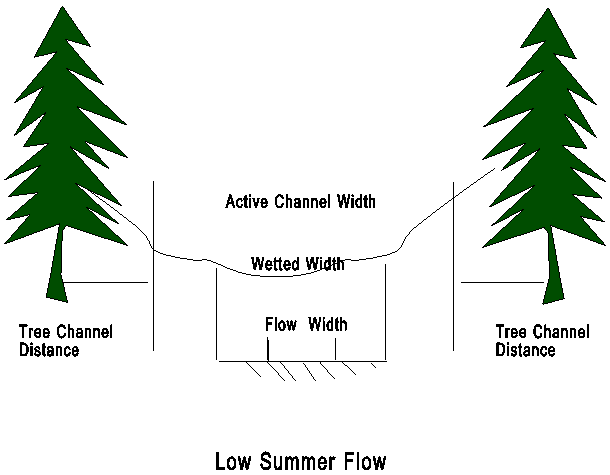
Nomenclature for stream data.
6. CONVERTING OLD DATA SETS
TWO file conversion utilities have been included on your diskette with a README file on how to use them. P2NU.EXE converts polygon data from the old format (prior to Version 2.03) to the new format. L2NU.EXE converts road data from the old format to the new format.
7. CREATING DATA SETS IN ARCINFO
SNAP does not have an option to import data sets from ARCINFO. The Washington DNR has created utilities to convert ARCINFO data sets for SNAP input. Call Jack Cullen, Division of Engineering, Washington DNR, Olympia, Washington at (360) 902-1171 for information and availability of this software.
8. CREATING SPATIAL DATA USING SNAPMAP
Ward Carson has developed a utility for digitizing data in SNAP format for unit, link, and stream files. He can be contacted at (541) 737-4451.
9. MANIPULATING TABULAR ATTRIBUTE DATA
Several utilities have been developed using spreadsheets and database programs for manipulating tabular data outside of SNAP and creating tabular data input for SNAP (.UA, .LA. .SA files). Contact Kathy Sleavin, USDA Forest Service, Fort Collins, CO. at (303) 498-1833 for information.