CHAPTER SIX - DIRECTORIES
The SNAP program is designed to reside in the \SNAP directory of your hard disk device. Data created by you for Sale, Link, Mill, and other files can reside in any directory you choose by the name you specify in the common path in the Project File Name Editor. For example, in the Project File Name Editor screen below, all data files are in the D:\SNAP\FOREST subdirectory. These files are created by SNAP if they did not already exist. If you have data files in other subdirectories that you want to use, they can be copied into the common path subdirectory, in this case the D:\SNAP\FOREST directory before trying to access them. Or, you can type in their path names directly in the editor at the appropriate row.
If you have other files in D:\SNAP\FOREST directory you want to use that have a different common name, you can access them by changing the path name for the particular files in the Project File editor. For example, if you have a .US file which has the name PUGH_CRK, you could overwrite the D:\FOREST\SNAP_CRK.US name with the name D:\SNAP\FOREST\PUGH_CRK.US. SNAP would then access D:\SNAP\FOREST\PUGH_CRK.US for your unit stick data. All reports from SNAP are sent to the Analysis Report sudirectory named OUTPUT., which is a subdirectory of the common path created by SNAP. In the case of the screen below the reports will be
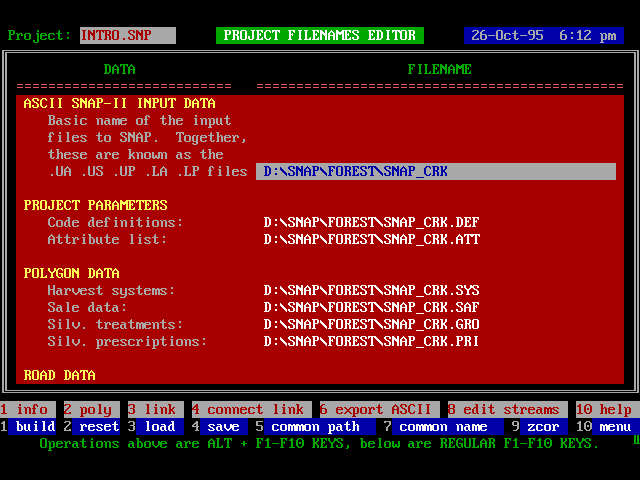
sent to the D:\SNAP\FOREST\OUTPUT subdirectory. Within the D:\FOREST\SNAP\OUTPUT. subdirectory, SNAP will automatically create an additional subdirectory for each pattern. For example the first pattern will be in the D:\SNAP\FOREST\OUTPUT\PATT_1 subdirectory and so on. It is not necessary for you to be concerned with these directories as SNAP will automatically access them for reports when you select the pattern number for which you want to receive the report. What is important is that if you come back to SNAP sometime later and want to access an old report you must have the correct path name.
If you want to save your reports to a different directory than the OUTPUT directory, remember to change the path in the Project Filenames Editor before running the Analysis.
Example Tree for Report Subdirectories
C:\SNAP
D:\TEST
\OUTPUT
\PATT_1
\PATT_2
\PATT_3
\REPORTS
\UNITS
\GRID
\SNAP_CRK
Definitions:
C:\SNAP = directory where SNAP program resides as well as (.SNP) to tell SNAP where to go to get project data.
D:\TEST = directory where project data files for Project TEST reside.
\OUTPUT = subdirectory of D:\TEST created by SNAP where reports from analysis of Project TEST are sent.
\PATT_1 = subdirectory of \OUTPUT created by SNAP to store Pattern 1 of the analysis of Project TEST.
\REPORTS = file name in subdirectory \PATT_3 for an optional ASCII file containing copy of all tabular reports created by SNAP for Pattern 3.
\UNITS = file name in subdirectory \PATT_3 for an optional ASCII file containing harvest record of all units in Project TEST for Pattern 3.