FE423 - Watershed Analysis
Connecting to Highlead
You have been given space on the Forest Engineering departments server, Highlead. This space can be used for any school related work you do this quarter. If you do not have an account on Highlead yet, please come see Luke in Bloedel 355.
Please note that FTP is the only way to connect when off Campus.
Connecting to Highlead using FTP
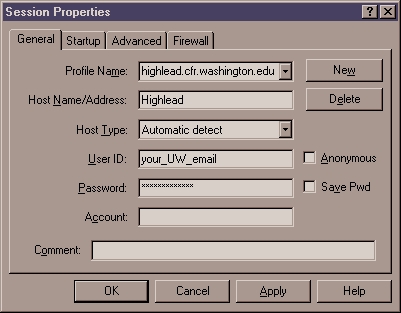
1) Use your favorite FTP program to access highlead via FTP. Use the following settings to connect:
Use your UW email name as the User ID and the password you entered when I created the account for you.
2) Be sure not to save your password otherwise others may gain acces to your account!
Connecting to Highlead using Map Network Drive
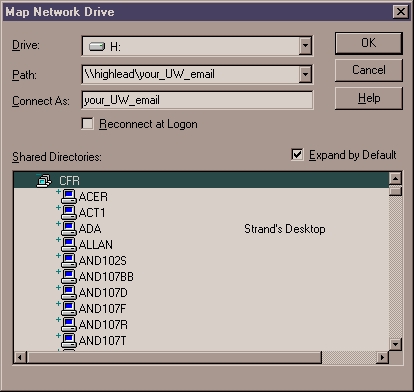
1) Using the Windows Explorer open the Map Network Drive Dialog under Tools > Map Network Drive
2) Enter the following information into the dialog, replace your_UW_email with your email name. You can use any drive letter you wish, I prefer H:\ for Highlead:
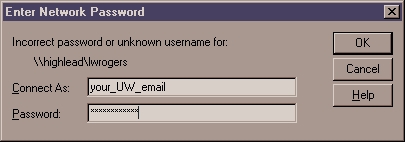
3) Hit OK and when prompted enter your password:
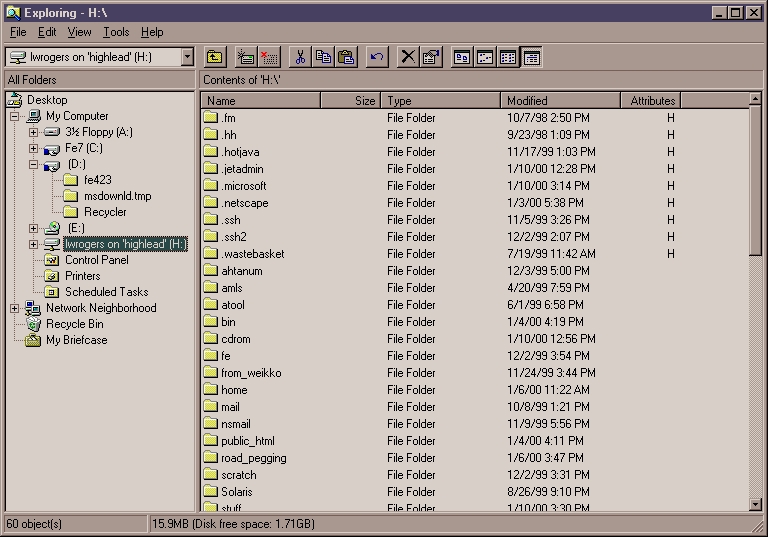
4) You will now see a new drive under the C:\ drive in the windows explorer called your_UW_email on 'highlead':
5) To disconnect from the drive use the Tools > Disconnect Network Drive option.
That's it! If you have any problems please come see me in Bloedel 355 of email me at luke@nwgeospatial.com